We review your request and contact you to agree the next step. Pilot access is by invitation; submitting this form does not create an account or provision a workspace.
Works in your browser Guided setup with your team Traceable stock movements
DOCK 02 · ACTIVE
BATCH EXP ≤ 14D
LEDGER SYNC OK
FEFO READY
Illustrative workspaceB-2417 · exp 12dFEFOLedger OK
WILS◉ Pilot warehouse
Overview
Receiving
Inventory
Picking
Dispatch
Portal
Analytics
E07 · Pilot warehouseLedger OKMon 27 Apr · 14:22
Total items
1,284
In stock
Occupied locations
312
of 420 bins
Available locations
108
Ready for put-away
Active picks
34
12 urgent
Expiring ≤30d
7
⚠ 3 within 14d
Ledger status
C1 OK
C2 · C3 pass
Receiving volume — last 7 days
BatchLocationQuantityStatus
REC-2026-0482A-P03-S01240In stock
LOT-EU-88412B-P01-S0290Exp. 14d
REC-2026-0479A-P02-S01640Reserved
Expected today
5
2 in progress
Lines received
48
All verified
Exceptions
2
⚠ Needs review
Posted today
3
All verified
DeliverySupplierLinesStatus
ED-2026-0091Nordic Fresh Ltd12Posted
ED-2026-0092Galway Organics8Receiving
ED-2026-0093Dublin Pharma Co24Expected
Active batches
1,204
Across 3 zones
Location usage
78%
142 / 182 bins
Expiring ≤30d
23
⚠ 7 within 14d
Ledger status
OK
Integrity checks pass
ItemLocationQuantityExpiry
Omega-3 Fish Oil 1000mgA-P03-S014802026-11-15
Vitamin D3 Drops 50mlB-P01-S02902026-04-28
Probiotic Capsules 60ctA-P02-S016402026-09-30
Open pick lists
8
34 lines total
Completed today
14
Ledger posted
Short picks
1
⚠ Needs review
FEFO compliance
100%
All FEFO-ordered
Pick listCustomerLinesStatus
PL-2026-0312HealthPlus Dublin6In Progress
PL-2026-0313Galway Wellness4Pending
PL-2026-0311Cork Supplements9Complete
Ready to ship
6
Labels generated
Shipped today
18
Ledger posted
In transit
42
Tracking active
Delivered
156
This week
ShipmentCarrierTrackingStatus
SHP-2026-0891DPD IrelandDPD04892…Delivered
SHP-2026-0892An PostAP88421…In transit
SHP-2026-0893DHL Express—Ready
Portal customers
24
Active accounts
Open orders
12
Visible in portal
Returns open
3
Customer-initiated
Self-service rate
89%
↓ inbound calls
CustomerLast loginOrdersStatus
HealthPlus DublinToday 09:428Active
Galway WellnessYesterday5Active
Cork Supplements3 days ago12Return open
Carrier score
94%
DPD leads
Average delivery
1.8d
↓ 0.2d this month
Invoice variance
€12
3 unmatched
Carrier SLA compliance
97%
1 breach this week
Carrier performance — last 30 days
History
Movement history by design
Expiry
Expiry-first picking
3
Carrier adapters available
30d
Guided pilot window
Stock, people and everyday decisions
See what needs your attention today.
For a shop with a stockroom or a warehouse team, WILS brings together the information you would otherwise have to piece together from lists, counts and conversations.
Do I have it, and where is it?
Find stock without relying on memory.
Look up an item, its recorded quantity and its shelf or location. Check batches and upcoming expiries, then follow the movement history when a count does not add up.
See stock value and estimated days of cover, then review guidance to reduce reorders, plan a promotion or check an urgent reorder. The report also estimates the cost value above a 90-day stock reference for selected overstocked items.
Coverage and buying guidance cover up to ten selected items. They use recorded outbound movements over 90 days, costs and expiry dates; review them against seasonality and your business needs. Values require complete quantities and costs; missing costs can understate stock value.
Who is doing what, and what is still waiting?
Give the team a clear view of the work.
Assign supported warehouse tasks and let operators pick up unassigned work. My Tasks brings together their receiving, picking and other enabled tasks, with progress and priorities.
Available tasks depend on the enabled modules and each person’s role. Start with one workflow and follow it from assignment to completion.
Are orders leaving as quickly as I expect?
Compare the time from order to dispatch.
View the average time between recorded orders and dispatch, and compare activity with a previous period. Movements by operator, time and warehouse area help you choose where to investigate a change.
Advanced analytics: Professional and Enterprise. Results depend on recorded events and timestamps; activity counts are not a complete measure of staff productivity.
Low in the picking area, but stock is available in reserve?
Turn a low-stock threshold into a replenishment task.
Set a minimum and target quantity for a picking location. When the rule is checked and reserve stock is available, WILS creates a transfer task that can be assigned and followed through completion.
For example: 4 units at the picking location, a minimum of 10 and goods in reserve → a replenishment task to assign.
Professional and Enterprise workflows. Rules and any scheduled checks need configuration; an operator carries out and confirms the move.
Are frequently picked items in the right area?
Review where your busiest items are stored.
WILS ranks items by recorded outbound frequency and compares their location with its zone model. Review suggested moves for frequently handled items stored in reserve areas.
For example: a frequently picked item in a reserve zone → a suggested location change to review.
Professional and Enterprise. Validate suggestions against your warehouse layout; the operator confirms the move. No measured travel-time saving is implied.
We confirm the reports, permissions and workflows suited to your business during the pilot. Start with a small set of items and one question you want WILS to answer.
Request a guided pilotAll plans include a 30-day guided pilot at no charge. No credit card is required to start.
Familiar stockroom problems
Less guesswork in everyday work.
A missing item, a count that does not add up or an unclear handover: see how WILS helps you investigate and organise the next step.
Several people update stock, but changes are hard to follow.
When counts and notes are scattered across files and messages, it takes time to reconstruct what changed.
Click to see solution
A movement history your team can follow
Recorded stock changes identify the responsible operator, time and quantity. Review the history when you need to understand a difference.
Tx #98241 · E-07 · Transfer · 14:22:08
Yesterday's stock count and today's pick list disagree.
Pick lists are generated from a snapshot. By the time a picker reaches the shelf, the count has already changed.
Click to see solution
Check current records before preparing an order
Consult recorded stock and recent movements together. Integrity checks help identify differences that need investigation.
C1 PASS · C2 PASS · C3 PASS · 09:41:03
Expiry dates live in someone's notebook.
Lot numbers and best-before dates tracked on paper or in a personal spreadsheet column nobody else can see.
Click to see solution
Keep batch dates visible to the team
Review recorded batch numbers and expiry dates. Picking can prioritise the batches that expire first, and expiry views help you identify what needs attention.
B-2417 · exp 12d · FEFO priority
Receiving paperwork ≠ what the warehouse actually saw.
You expected 48 units but received 40. If nobody records the difference, the next person may rely on the wrong quantity.
Click to see solution
Check each delivery before adding it to stock
Confirm received quantities and record differences before posting stock. Keep the receiving record linked to the goods that entered.
DN-1043 · Dock 2 · 40/48 received · ⚠ variance
Stock is in the building — but no one knows exactly where.
Items were received and put away, but their precise location exists only in an operator's memory. Finding them means searching the floor.
Click to see solution
Give stock a recorded location
Record where each batch is put away. Another operator can look up its location and check the last recorded movement.
Aisle B · Shelf 03 · Slot 08 · last moved 09:41
Something goes wrong — and no one can trace who did it.
A quantity adjustment is made. Stock disappears from a location. There's no record of who acted, when, or why.
Click to see solution
Per-operator attribution on every transaction
Every stock movement records the responsible employee, the action taken, and the timestamp. Role-based access limits what each operator can do.
Tx #98244 · E-12 · Adjustment · 11:09:31
From receiving to dispatch
Keep everyday stock work connected.
Receive goods, find them, prepare orders and trace what changed. These workflows provide the recorded data behind your stock, activity and financial views.
Goods receivingSURFACE 01 / 06
Check what actually arrived.
Compare a delivery with the expected items, confirm quantities and record differences before posting stock. Keep the receiving record linked to what enters the warehouse.
DN-1043 · Dock 2 · 14 lines pending
Inventory ControlSURFACE 02 / 06
Find the item and its recorded location.
Look up stock by item, batch or location. See recorded quantities and movements together, so you can check an answer instead of relying on memory.
Aisle B · Shelf 03 · Slot 08
Batches & expirySURFACE 03 / 06
See which batches need attention.
Check upcoming expiry dates and prioritise the batches that expire first when picking. Test this workflow with the products you actually handle.
Batch B-2417 · expires in 12 days · FEFO recommended
Pick & PackSURFACE 04 / 06
Follow an order from pick to dispatch.
Use picking and packing steps to follow the items being prepared and confirm progress. Check the workflow with your operators during the pilot.
Pick list PL-082 · 12 urgent lines
Carrier DispatchSURFACE 05 / 06
Keep dispatch connected to the stock record.
Record handover within the outbound workflow. Carrier labels and tracking depend on the configured adapter, your carrier account and onboarding verification.
DPD · label generated · dispatch recorded
Audit & IntegritySURFACE 06 / 06
Reconstruct a stock movement.
Review quantities, locations, batches, operators and timestamps in the transaction history. Use those records to investigate a stock difference.
Tx #98231 · operator E07 · 14:22:08
Real WILS interface
See the workflow, not a mock-up.
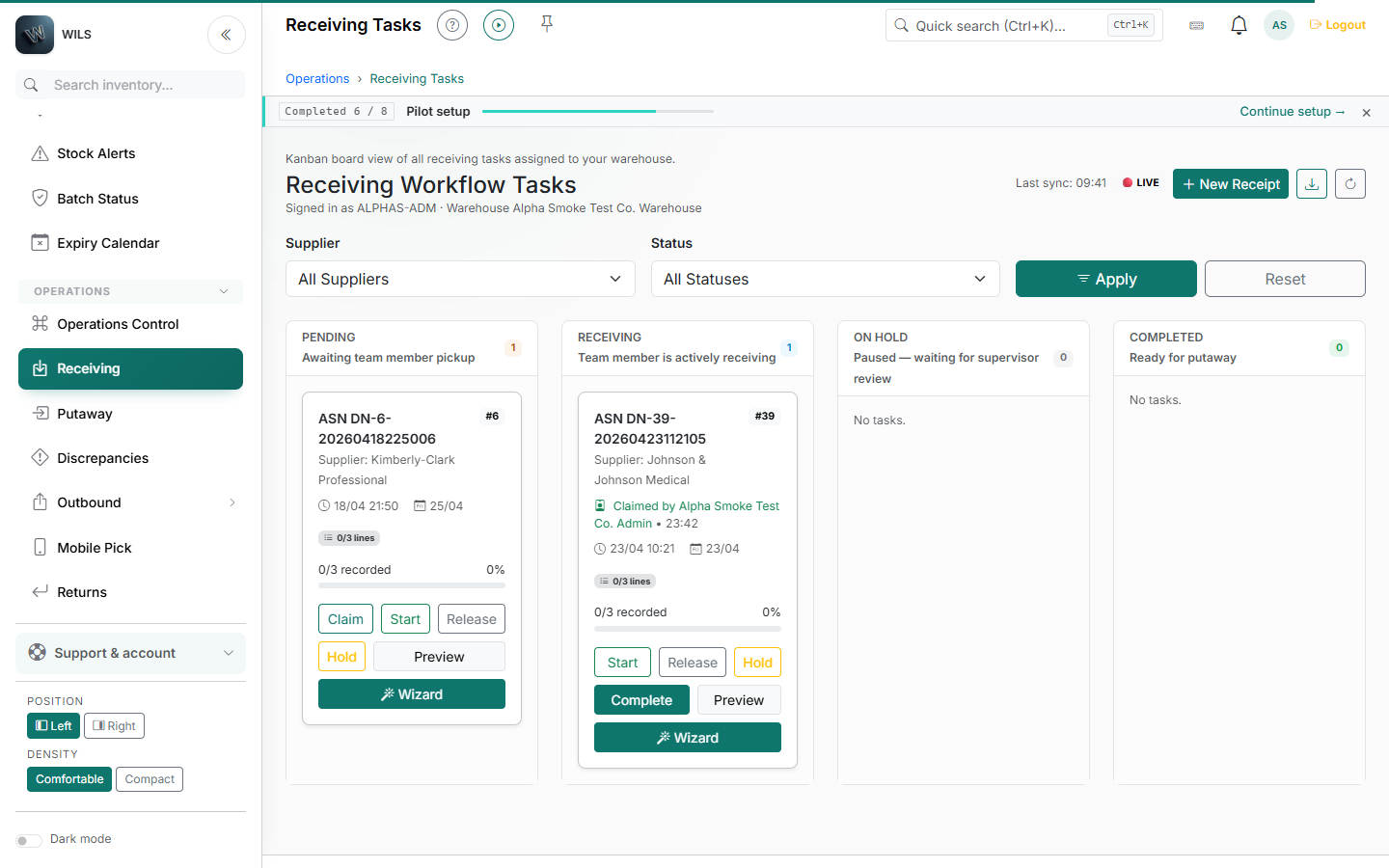
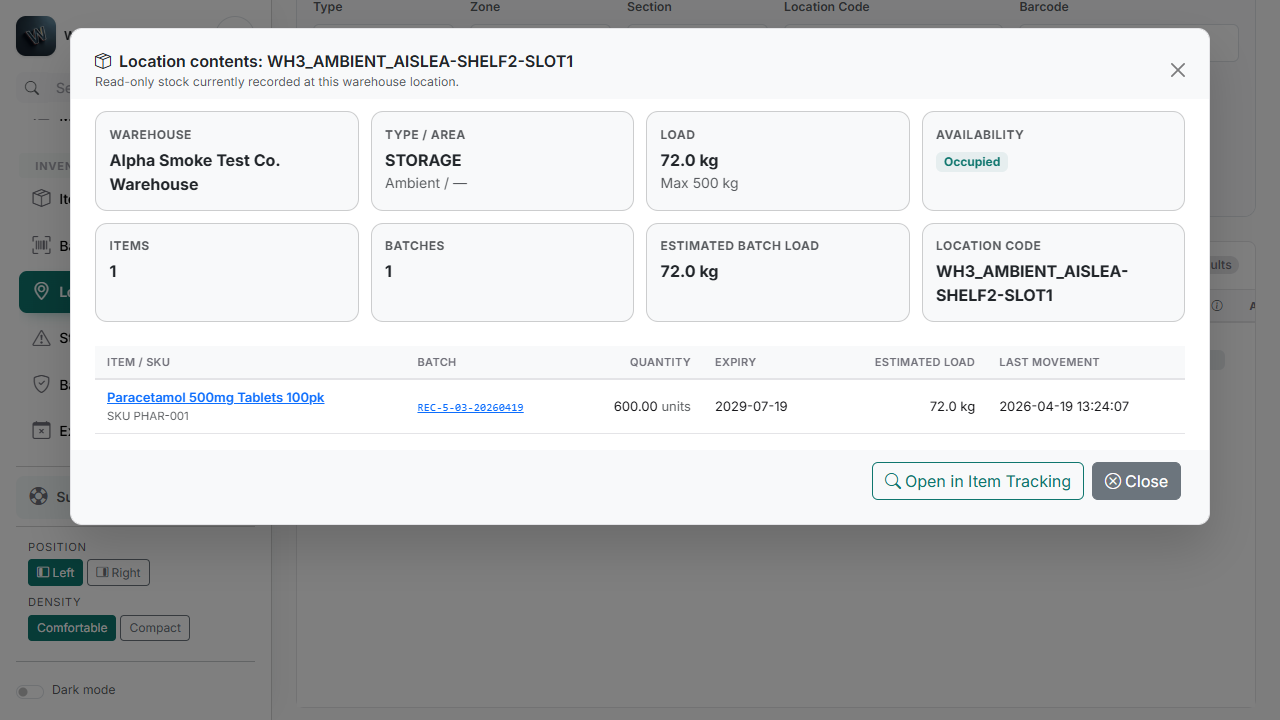
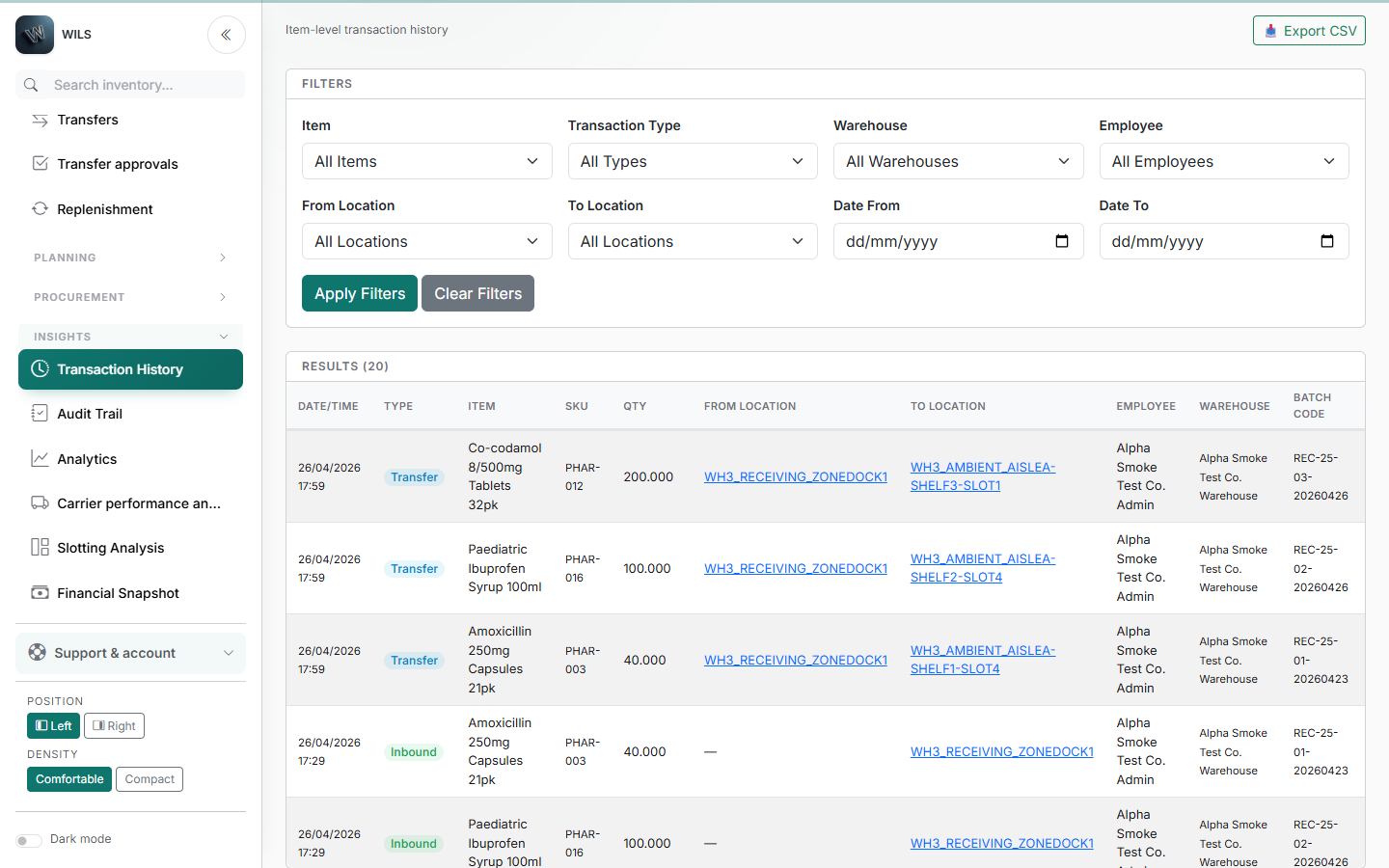
These screens show the current WILS demo baseline across receiving, stock location, and transaction traceability.
Captured in a non-production demo tenant. Available fields and actions depend on role, warehouse configuration, and enabled modules.
Receiving workflowStage, progress, due status, and ownership remain visible while warehouse teams work through inbound tasks. Exact stock locationA read-only location view connects each item and batch to its quantity, load, and latest recorded movement.Read the practical stock location guide Transaction traceabilityThe ledger records movement type, quantity, source and destination, operator, warehouse, and batch context.
Integration paths
Connect the systems around your warehouse
Compare the guided connection paths already represented in WILS, with each operational boundary stated clearly.
Connected system
Setup
Operational scope
Control boundary
Shopify
Available
Online catalogue and order fulfilment.
Guided setup; behaviour depends on the connected shop and reviewed mappings.
SumUp
Available
POS payments and counter-sale review.
Guided setup; sales are reviewed before warehouse stock is posted.
Zoho Inventory
Available
Read-only items, contacts and purchase-order intake.
Reviewed purchase orders become expected deliveries; only Receiving posts stock.
Available means setup can be started. It does not mean your WILS account is already connected or that every action in the external system is enabled.
Dispatch loop
From dock to carrier. Controlled end to end.
Switch between the main warehouse journeys to see where WILS creates control, evidence and operator ownership.
01
Plan the arrival
Create or import the expected delivery so the team knows what should arrive.
EXPECTED DELIVERY
02
Receive and verify
Operators capture items, quantities, batches and expiry data with supported scan or manual input.
SCAN OR TYPE
03
Record exceptions
Shortages, damage and hold conditions stay attached to the receiving task for review.
EXCEPTION RECORD
04
Put stock away
Verified stock is assigned to an authorised warehouse location.
LOCATION VERIFIED
05
Post the movement
Completion creates auditable stock movement evidence instead of editing balances directly.
MOVEMENT RECORDED
01
Identify the stock
Find an item by SKU, barcode, batch or location within the operator warehouse boundary.
ITEM + BATCH
02
Verify the location
Confirm where the stock is before a movement or count is accepted.
WAREHOUSE SCOPE
03
Move or count
Execute controlled movements and cycle counts with operator attribution.
OPERATOR OWNED
04
Surface differences
Integrity checks expose drift and exceptions for review.
INTEGRITY CHECK
05
Keep the audit trail
The resulting history supports investigation without hiding prior stock events.
AUDIT READY
01
Release the order
Approved demand becomes controlled outbound work for the assigned warehouse.
ORDER RELEASED
02
Pick by FEFO
Operators follow a guided pick using the correct item, batch and warehouse location.
PICK CONFIRMED
03
Pack and verify
Picked quantities are checked before the package is marked ready for dispatch.
PACK VERIFIED
04
Record the handover
The configured carrier handover stays linked to the outbound workflow and operator.
HANDOVER RECORDED
05
Preserve the evidence
Completion retains the order, batch, quantity, location, operator and timestamp in the audit trail.
LEDGER UPDATED
Traceability
When a quantity looks wrong, follow what happened.
Review receipts, transfers, dispatches and adjustments with their operator and time. Stock checks help you spot differences to investigate, while permissions control who can do what.
One history of stock movements
Quantity changes and transfers create movement records. Use them to reconstruct a difference instead of starting from memory.
Know who recorded each movement
Receiving, transfers, picking and adjustments record the responsible operator and time.
All plans include a 30-day guided pilot at no charge. No credit card is required to start.
Onboarding
Start with one task. Try it with your team.
WILS is in beta. Choose a receipt, an order or a shelf count. We agree the scope and guide the setup, so your team can try real work before you decide whether to expand. Timing and integrations are agreed around your needs.
Tell us about your warehouse and current tools. We review fit together; approved pilots receive a private invitation before setup.
2
Import your items and opening stock
Upload your item catalogue from a CSV file or add items individually. WILS checks the data before saving it.
3
Find an item and its location
Check where an item is held and which batch is available. Use a small, agreed set of items to evaluate the workflow.
4
Trace a receipt and prepare an order
Follow receiving, batch details, picking and dispatch in the agreed pilot scope. Confirm required integrations before using live data.
5
Review the results before expanding
Compare the agreed tasks with how your team works today. Review usability, traceability and setup effort before deciding the next step.
FAQ
Common questions
Why consider WILS instead of a larger system or another SaaS?
Consider WILS if you want to evaluate connected stock, locations and warehouse tasks through a limited guided pilot. You can assess usability, traceability and setup effort before expanding. WILS is in beta, not a complete ERP, accounting or till replacement; required integrations must be checked first. If your current software already covers these needs well, switching may not be worthwhile.
Do I need to install anything?
No desktop installation is required. WILS runs in a supported modern browser on desktop, tablet, or phone.
Does it work without barcode scanners?
Yes. WILS supports camera-assisted scanning on supported devices, manual keyboard entry, and dedicated HID barcode scanners. Camera results depend on browser support, permissions, lighting, and barcode quality.
Which carriers are supported?
Configured adapters are available for DPD Ireland, An Post, and DHL Express, with OwnFleet and manual dispatch options. Availability depends on carrier account, credentials, and onboarding verification.
Does WILS replace my EPOS?
No. WILS works alongside your till and payment system. EPOS handles sales and payments; WILS receives supported sales orders and manages warehouse stock, locations, batches, picking, and dispatch.
How long does setup take?
Standard pilots use a guided checklist, CSV import, and in-app tours. Timing depends on catalogue quality, warehouse complexity, integrations, and the data being prepared.
Is my data safe?
Deployment and hosting arrangements are agreed during onboarding. Core stock mutations create ledger records, while role and warehouse scope control what each operator can see and do.
Can I run multiple warehouses?
Yes. Professional supports up to 3 warehouses with boundary enforcement. Enterprise capacity is agreed for multi-site operations.
What does the customer portal show?
Customer users access order and stock views according to enabled capabilities. Shipment, tracking, returns, and delivery documents depend on the configured role and workflow.
Is there a free trial?
Yes. Every plan starts with a 30-day guided pilot at no charge and no credit card is required. You can use real data and workflows before choosing a subscription.
Operational experience, built into the product
WILS was shaped by the warehouse floor—not just the development desk.
The product combines hands-on warehouse and supply-chain experience with structured software development, for real stock movements and operational pressures.
Practical by designWorkflows are built around what warehouse teams actually need to complete, understand, and verify.
Evidence behind the claimsFeatures are demonstrated through working behaviour, tested processes, and transparent product boundaries.
Direct product ownershipOperational feedback and customer needs influence product decisions without unnecessary layers.
Ledger OK
DOCK 02 · ACTIVE
PILOT // OPEN
Start with one question about your stock or team.
Try WILS with a free 30-day guided pilot. Agree a small test: find an item, follow a task or review stock value. We help you prepare the data and assess the result.