Practical warehouse guide
How to organise stock locations in a small business
Knowing that you have ten units is not enough when nobody knows which shelf holds them. For a shop with a stockroom, a wholesaler or a small distributor, a consistent location system gives the next person a place to start looking.
A stock location identifies a physical place, not a product. Keep the product code (SKU), quantity and location separate; add the batch or expiry date when relevant. One product can occupy several locations, and one location can contain several products.
Five steps you can start with
-
Give each physical place a stable code
Choose a short structure such as A-02-03: aisle A, rack 02, shelf 03. For a small stockroom, A-01 may be enough. Put readable labels on the actual shelves and use exactly the same codes in your records. Avoid names that change when a different product arrives.
-
Check goods before putting them away
Compare the arrival with what was expected. Record the quantity actually accepted, not just the supplier’s quantity. Keep damaged goods or unresolved differences separate from usable stock. Record where the accepted units are put away.
-
Record both sides of every move
When three units move from storage to a picking shelf, reduce the source by three and increase the destination by three. The total has not changed. Record the item, quantity, source, destination, person and time so another operator can follow the movement.
-
Keep a sale separate from an internal transfer
Moving goods to the shop floor does not by itself mean they have been sold. Record the actual sale or dispatch through the appropriate outbound process. Otherwise you risk counting the same reduction twice or keeping sold stock available.
-
Count a location and investigate differences
Start with one shelf. Compare the physical count with the recorded quantity for each item and, where relevant, batch. Check recent receipts, moves and dispatches before making an authorised adjustment with a reason. Do not overwrite a total simply to hide a discrepancy.
Worked example: ten units, two locations
This fictional example uses one item, one batch and units rather than cases. Receive ten units into A-01, move three to B-02, then dispatch two from B-02. An internal transfer changes the distribution, not the total.
| Operation | A-01 | B-02 | Total |
|---|---|---|---|
| Receive 10 | 10 | 0 | 10 |
| Move 3 | 7 | 3 | 10 |
| Dispatch 2 | 7 | 1 | 8 |
The final check is 7 + 1 = 8. If the shelf holds a different quantity, inspect the movement history and recount. This table is a worked example, not a live customer record or a claim about measured savings.
When is a spreadsheet enough?
A spreadsheet can be a reasonable starting point when one person controls a small, stable stockroom. Reassess it when several people update quantities, the same item occupies multiple shelves, or batches and unexplained differences become hard to trace. Compare systems using your own workflow, not the longest feature list.
Where WILS fits
WILS (Warehouse Item Location System) brings receiving, stock by location and movement history into a warehouse workflow. It is in beta and is intended for small retailers, wholesalers and distributors. The useful comparison with a larger WMS or another SaaS is whether your team can trace a receipt, find stock and explain a movement. It is not a claim that WILS replaces every ERP or suits every operation.
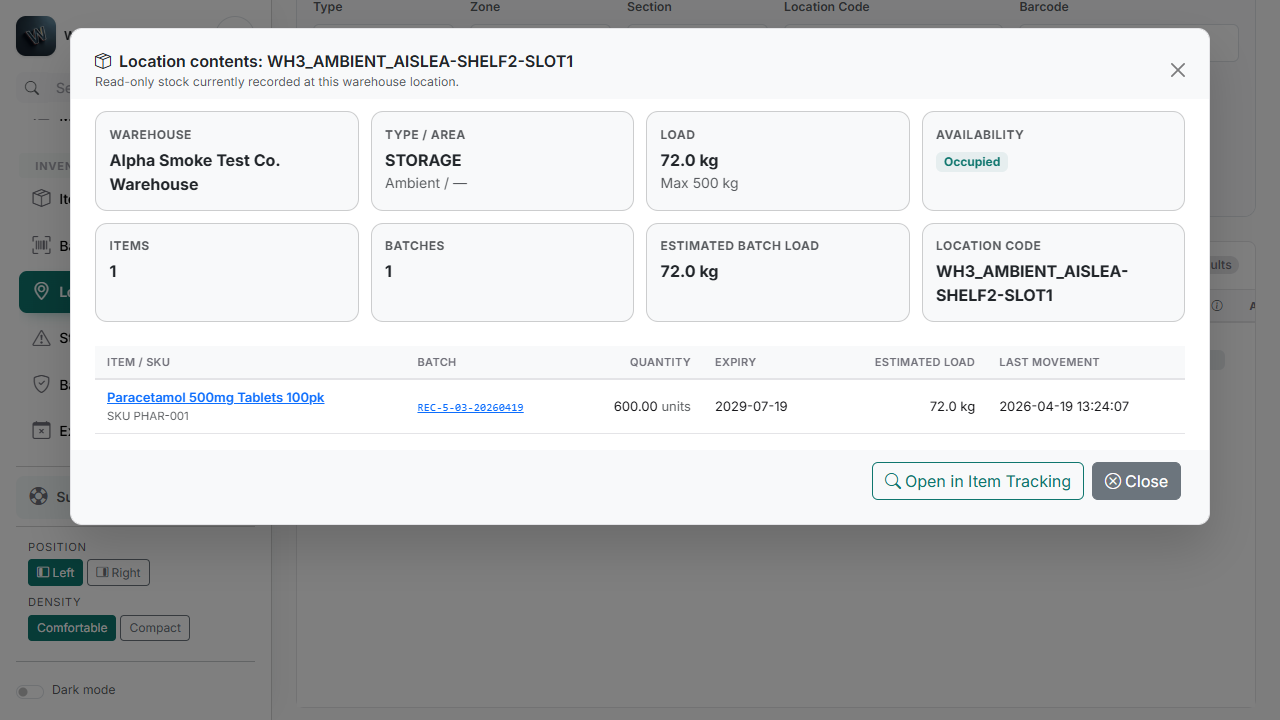
Use the pilot to test one real workflow
Agree a small test with WILS before changing your operating process. Use a sample item and two locations, and check these four outcomes with the person who will use the system:
- The accepted receipt matches the quantity actually received.
- Another operator can find the item’s physical location.
- A transfer changes both locations without changing the total.
- The movement history explains the remaining quantity.
We review your request and contact you to agree the next step. Pilot access is by invitation; submitting this form does not create an account or provision a workspace.